
Stand Out From Every Other
Flat Lay on Etsy
Here's the truth about Etsy: 90% of clothing sellers use flat lays or mannequin shots. They all look the same. Your handmade cardigan looks just like the 400 other cardigans in search results. Professional model photos make you look like a real brand, not someone selling out of their spare bedroom.
Upload your clothing → Pick AI model → Generate professional photos in 60 seconds
Etsy-ready photos from one product image
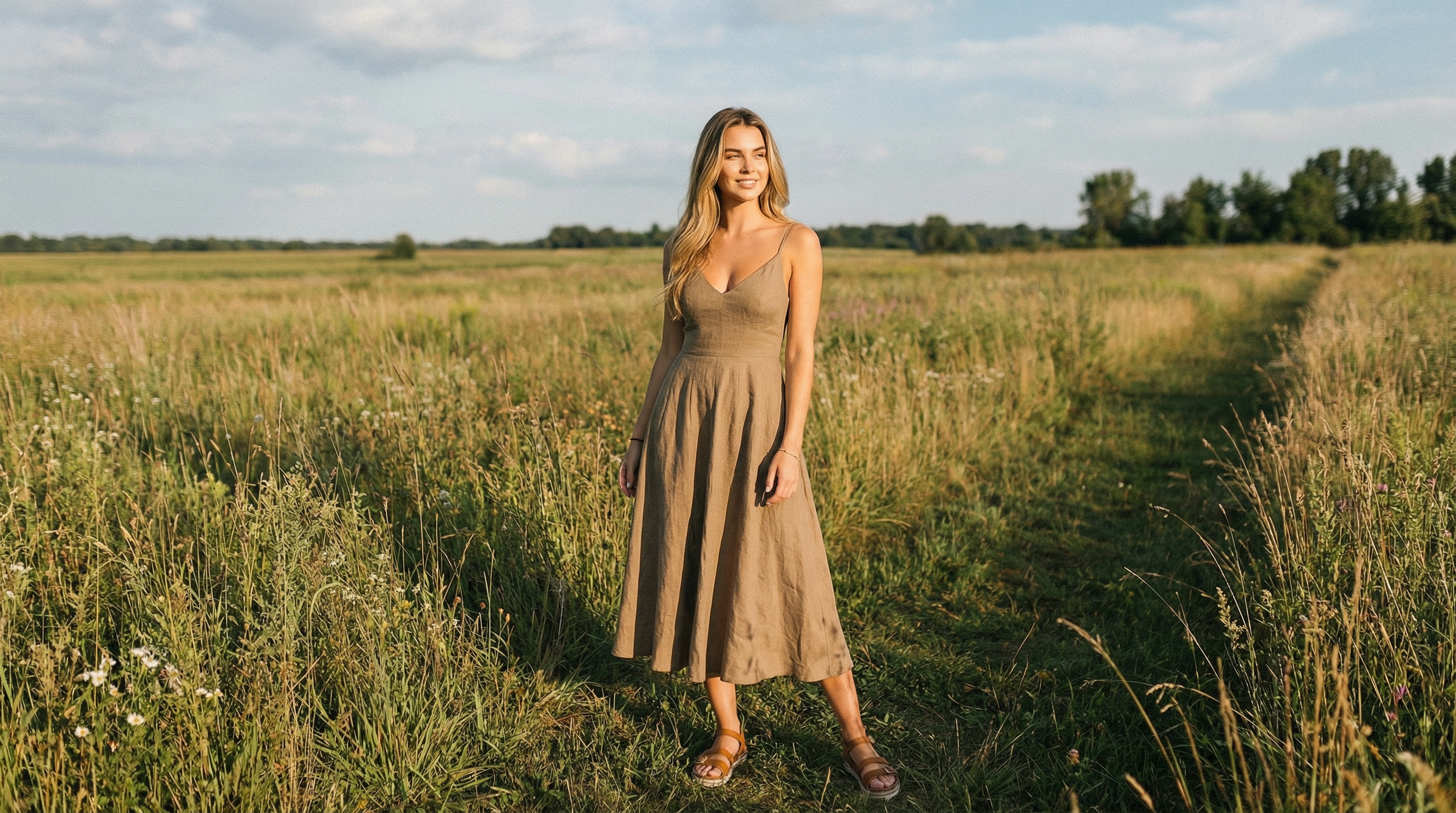 Lifestyle photo — Made with TrayvePostReady
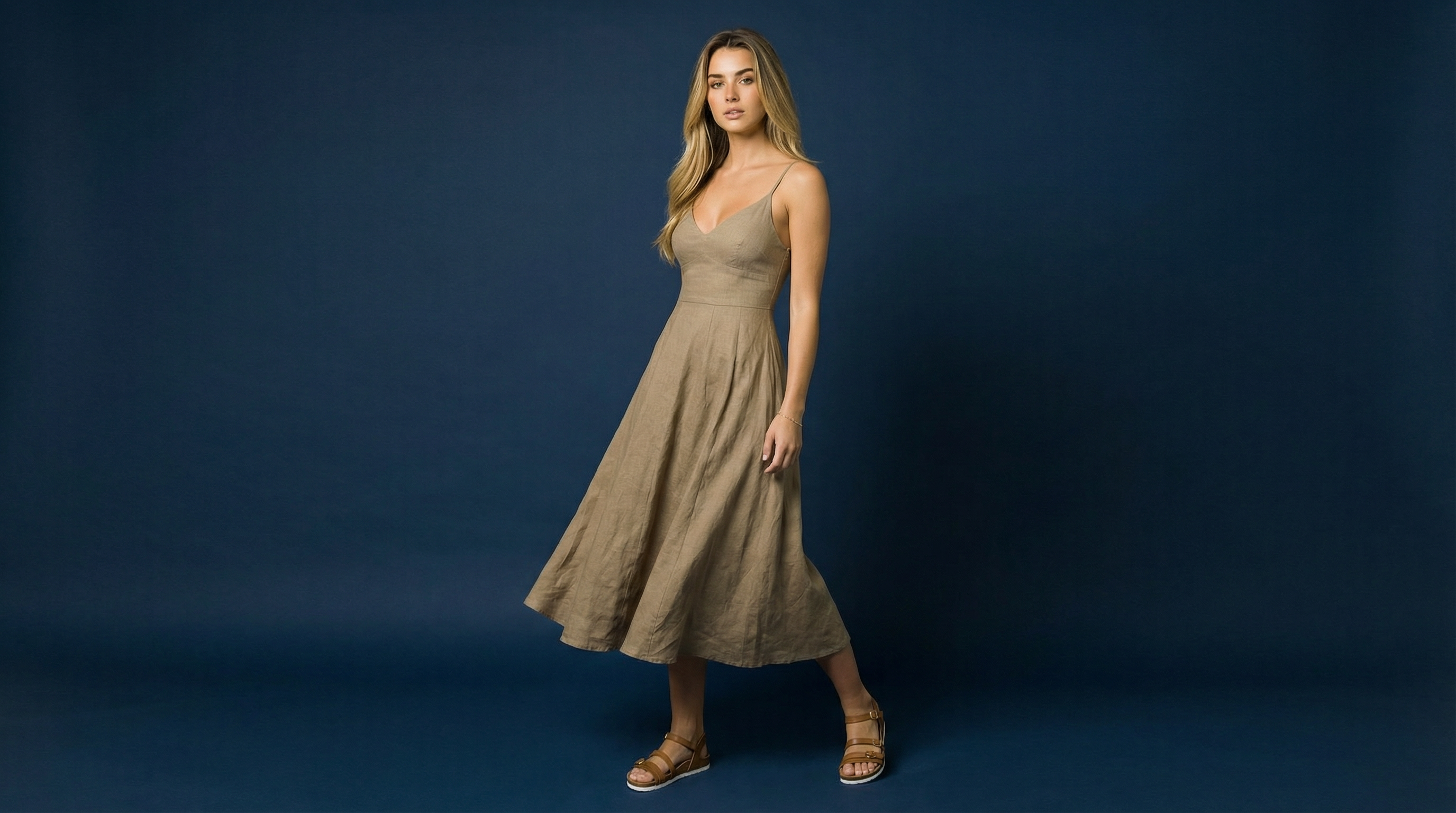 Product photo — Made with TrayveShopReady
One product photo in → studio-quality images out. No camera, no models, no studio.
"Wait, Is AI Photography Even Allowed on Etsy?"
Yes. Here's what you need to know.
I get this question constantly, so let me clear it up right now:
Etsy's policy applies to AI-generated products, not AI-enhanced photos of real products.
✗Not allowed: Selling AI-generated art as "handmade" (obviously)
✓Totally allowed: Using AI to photograph your actual handmade products
Think of it like this: You hand-sew a linen dress. That's your handmade product. You use Photoshop to remove the background from your photo. That's just photo editing. Using AI to put your dress on an AI model? Same thing—just better photo editing.
The dress is still handmade by you. The photo is just enhanced. Etsy cares that you're accurately representing what the customer will receive. AI model photos show your actual product—just styled professionally.
Bottom line:
If you made it by hand, you can photograph it however you want. Many successful Etsy sellers already use enhanced photography. This is just the next step.
Why Etsy Sellers Need More Than Flat Lays
Etsy search results are 90% flat lays and mannequins. Flat lays show dimensions but not fit. Mannequins show shape but look impersonal. Real model photos show how your item actually looks on a person - and that's what gets clicks.
Let me explain the Etsy problem. You make beautiful, handmade clothing. You photograph it flat on a table or hung on a hanger. You list it. It gets buried on page 3. Why?
Because every other Etsy clothing seller is doing the exact same thing. When someone searches "handmade linen dress" on Etsy, they see 40 flat lay photos and 30 mannequin shots. They all blend together. Nobody stands out.
Look at the Etsy sellers doing really well - the ones with thousands of sales. They all have professional model photos. Why? Because model photos answer the questions buyers actually have:
- How does it fit? Flat lays can't show this. Model photos do.
- What's the drape like? Does it hang loose or hug the body? Can't tell from flat lays.
- What's the length? "Knee-length" means different things for different heights. Model photos show it.
- Is this a serious shop? Professional photos signal you're a real business, not a hobby.
Here's the part that hurts: you know professional photos would help. But hiring a model costs $300-$600 for a few hours. If you're making small batches of handmade items, that's completely unrealistic. So you stick with flat lays, and your listings keep getting buried.
This is where AI model photography actually makes sense. You photograph your item once (flat or on hanger), upload it, pick an AI model, and 60 seconds later you've got professional-looking model photos. Need a different angle? Different model? Different pose? Generate more.
The result: your listings look like they came from an established brand, not a spare bedroom operation. And on Etsy, where perception is everything, that matters.
Stand out from flat lays — get model photos instantly
Editorial content — Made with TrayvePostReadyCatalog listing — Made with TrayveShopReadyOne product photo in → studio-quality images out. No camera, no models, no studio.
How It Works (Simple 5-Step Process)
Takes 2-3 minutes per item after you've done it once. Upload your handmade piece, pick an AI model, choose poses, generate, and download. Photos come out sized for Etsy (2000px minimum width). Use them as your main listing photo or fill all 10 photo slots.
Here's the exact workflow:
Photograph Your Item
Take a clear photo of your handmade clothing. Lay it flat on a surface, hang it on a hanger, or drape it on a form - whatever's easiest. Front and back photos help, but front-only works fine.
You don't need professional lighting or a white background. Natural light from a window works. The AI processes the garment and handles the rest. JPG or PNG format.
Select AI Model & Pose
Pick from 22 AI models with different ages, body types, and looks. Choose whoever fits your brand's aesthetic. Then select from 6 poses - standing, casual, editorial, sitting, walking.
This is powerful for Etsy because you can match the model to your target customer. Selling bohemian maxi dresses? Pick a model with that vibe. Selling minimalist linen? Pick someone with a clean, simple look.
Generate Model Photos
Hit generate. 60 seconds later, you've got professional model photos showing your item on a person. You can select up to 4 poses at once, so you'll get multiple angles from a single generation.
These are production-ready photos. Download and upload them directly to your Etsy listing. No editing required (unless you want to adjust colors or brightness).
Create Lifestyle Shots (PostReady)
Take those model photos and drop them into lifestyle backgrounds using PostReady mode. Coffee shops, outdoor gardens, cozy home interiors, seasonal settings. 24 background options included, or upload your own.
This step is optional but powerful. Lifestyle shots help Etsy buyers imagine owning and wearing your item. A handmade sweater photographed in a cozy living room sells better than the same sweater on a plain background.
Upload to Etsy Listing
Download all your photos and upload them to your Etsy listing. Use a model photo as your main listing image (it'll show up in search results). Fill the other 9 slots with different poses, angles, and lifestyle shots.
Pro tip: Put the most eye-catching photo first. That's what gets shoppers to click from search results. Then show multiple angles so they can see fit and details.
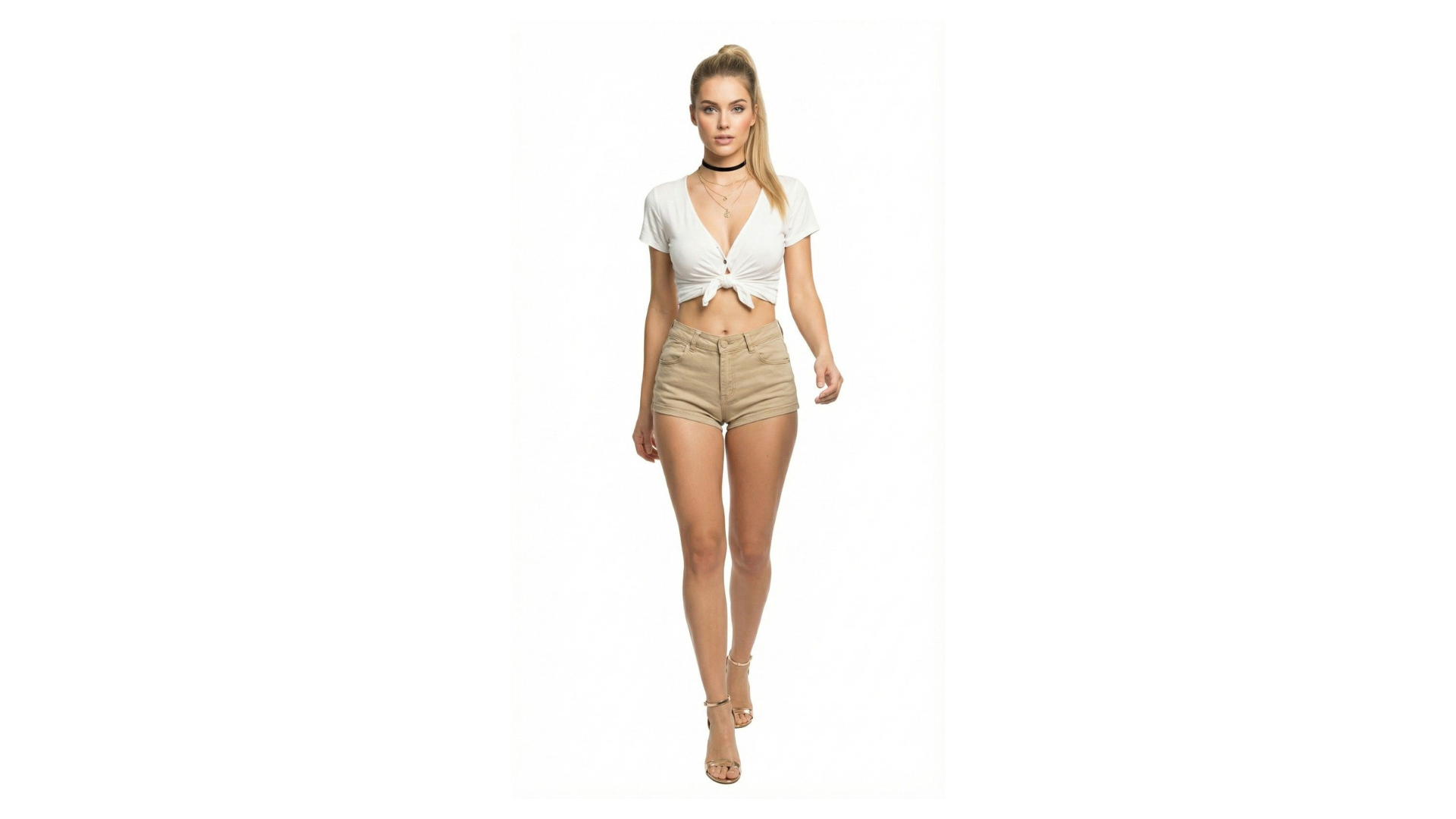
Virtual Try-On creates model photos you can use directly in Etsy listings
How Professional Photos Help You Stand Out
Etsy search results are visually competitive. Your main listing photo determines who clicks. A professional model photo grabs attention 10x better than a flat lay because it shows the item in context, on a person, looking wearable.
Let's be specific about why this matters for Etsy. When someone searches for "linen dress" or "handmade cardigan," Etsy shows a grid of thumbnails. Your main photo has about 0.5 seconds to grab their attention before they scroll past.
Here's what typically happens:
Flat Lay Photos
Item lying flat on a table or floor. Every clothing seller does this. All the thumbnails look identical. Click-through rate: low. Conversion rate: low.
Mannequin Photos
Better than flat lays because it shows shape. But mannequins look stiff and impersonal. Buyers still can't tell how it drapes or moves. Medium click-through rate.
Model Photos
Shows the item on a person, in a natural pose, with realistic fit and drape. Stands out immediately in search results. High click-through rate. High conversion rate. Fewer returns because buyers know what they're getting.
The successful Etsy shops - the ones with "Star Seller" badges and thousands of reviews - almost all use professional model photos. Not because they have huge budgets, but because they figured out it's worth the investment.
Traditional approach: hire a model once or twice a year. Cost: $400-$800 per session. Photograph 10-15 items. Then when you create new items, you're back to flat lays until the next photoshoot.
AI approach: $29-$199/month depending on volume. No session scheduling. Generate professional photos for every single item you make, whenever you make it. Your entire shop looks professional and consistent.
Bottom line: on Etsy, where most sellers are hobbyists using phones and flat lays, professional model photos make you look like an established brand. That perception drives clicks and sales.
Why Etsy's Algorithm Rewards Better Photos
Etsy's search ranking isn't just keywords. It weighs click-through rate heavily. If your listing gets more clicks than competing listings, Etsy shows it higher in search results. Professional photos = more clicks = better ranking = more visibility.
Let me explain how Etsy search actually works, because it directly impacts whether professional photos are worth it (spoiler: they are).
Etsy's algorithm looks at multiple factors, but three big ones matter:
- Listing Quality Score: Etsy evaluates your photos, title, tags, and description. High-quality photos boost this score. Professional model shots consistently score higher than flat lays.
- Click-Through Rate (CTR): If shoppers see your listing in search and click it more often than similar listings, Etsy interprets that as "this listing is more appealing" and ranks it higher. Better photos = higher CTR.
- Conversion Rate: If people click your listing and actually buy, Etsy ranks you even higher. Model photos reduce confusion about fit and look, which increases purchases and reduces returns.
Here's where it gets interesting: Etsy explicitly uses visual appeal as a ranking factor. They're not just looking at keywords - they're analyzing whether your main photo will get clicks.
Real Example: Visual Appeal Impact
Two listings for "handmade linen dress":
Listing A: Flat lay photo
CTR: 1.2% → Appears on page 3 of search results → Gets 50 views/month → Makes 2 sales/month
Listing B: Professional model photo
CTR: 4.8% → Appears on page 1 of search results → Gets 400 views/month → Makes 20 sales/month
This isn't hypothetical. Multiple Etsy sellers report significant ranking improvements after switching from flat lays to model photos. The algorithm recognizes visual appeal, and buyers naturally click professional-looking listings more often.
One more factor: Etsy now has visual search. Shoppers can upload a photo and find similar items. If your listing photos look professional and clearly show the item, you're more likely to appear in visual search results.
The takeaway: Better photos aren't just aesthetic. They directly impact your Etsy search ranking, which determines how many people see your listings at all.
Three Types of Photos You Can Create
You get three separate tools. Virtual Try-On creates model photos. PostReady adds lifestyle backgrounds. ShopReady generates clean product shots. Use them separately or together to fill all 10 photo slots on your Etsy listings.
Virtual Try-On— Model Photos
This is your core tool for Etsy. Upload your handmade clothing, pick an AI model, choose poses, and generate professional model photos. 22 models available. 6 poses. Up to 4 poses at once.
Best for Etsy: Main listing photos, showing fit and drape, demonstrating how the item looks on a person. These are production-ready images you can upload directly to listings.
Watch: Virtual Try-On in action—quick preview mode for testing different models
PostReady— Lifestyle Backgrounds
Take your Virtual Try-On model photos and drop them into lifestyle settings. Coffee shops, outdoor gardens, home interiors, seasonal backdrops. 24 backgrounds included, or upload your own custom background.
Best for Etsy: Creating aspirational lifestyle shots that help buyers imagine wearing your item. A handmade dress in a garden setting or cozy cardigan by a fireplace. These photos increase emotional connection and purchase intent.
Watch: PostReady demonstration—production-ready lifestyle photos with 24 background options
ShopReady— Clean Product Shots
Generate clean, professional product photography from your model photos. White backgrounds, colored backgrounds, multiple angles (front, side, back, detail shots). All automatically generated from a single original photo.
Best for Etsy: Detail shots showing texture, stitching, fabric quality. These complement your model photos by showing craftsmanship up close. Production-ready images for listing slots 6-10.
Watch: ShopReady in action—production-ready white background photos perfect for main listing images
Recommended Etsy Listing Photo Strategy
Photo 1-3: Virtual Try-On model photos (different poses/angles) - this grabs attention in search
Photo 4-6: PostReady lifestyle shots (showing item in context)
Photo 7-10: ShopReady detail shots (fabric texture, stitching, close-ups)
This combination shows: how it fits (model), how it looks in real life (lifestyle), and craftsmanship quality (detail). All bases covered.
Real Cost Comparison: Traditional vs AI
Most Etsy sellers can't afford professional model photography. The numbers don't work when you're selling handmade items in small batches. Let's look at the actual costs and why AI makes sense for small-scale sellers.
Traditional model photography for Etsy sellers breaks down like this:
Traditional Professional Photoshoot
Realistically photographs 8-12 items per session
Here's the problem: if you're a solo Etsy seller making handmade dresses or cardigans, you're not producing 50 items at once. You make 3-5 pieces per week. Booking a photoshoot for 3 items doesn't make financial sense.
So what happens? You stick with flat lays or mannequins. Your listings don't stand out. Sales stay low. The cycle continues.
AI Model Photography (Trayve)
Photograph unlimited items. No scheduling. Generate photos on-demand whenever you create new inventory.
The math for small-batch Etsy sellers is simple: you can't justify $1,500 photoshoots for 5 items. But $29-$199/month? That works. If better photos help you sell 3-4 more items per month, you've already broken even.
And here's what makes it valuable: consistency. Every single item you make gets professional photos. Your entire Etsy shop looks polished and established, not piecemeal with some items having great photos and others having flat lays.
Real Scenario: Small Batch Etsy Seller
You make: 4 handmade dresses per week = 16/month
Photos needed: 6 photos per dress = 96 images/month (96,000 credits)
Traditional cost: $1,500 photoshoot (can't justify booking one)
AI cost: $89/month (Professional Plan) = $5.56 per dress
Result: All 16 dresses get professional model photos. Your shop looks consistent and professional. Click-through rate improves. Sales increase.
Etsy's Photo Requirements (We Handle Them)
Etsy has specific technical requirements for listing photos. Minimum 2000px width, 72 DPI minimum, accepted formats. All AI photos we generate meet these specs automatically - just download and upload.
Here's what Etsy requires for listing photos, and how the generated photos handle it:
Image Dimensions
Etsy requires: Minimum 2000px on the longest side
We provide: 2048x2048px or higher (fully compliant)
File Format
Etsy accepts: JPG, PNG, GIF
We provide: JPG and PNG (both work perfectly)
File Size
Etsy allows: Up to 10 MB per photo
We provide: Typically 2-4 MB (high quality, fast loading)
Resolution
Etsy suggests: 72 DPI minimum
We provide: High-resolution photos (exceeds minimum)
Etsy's Photo Policy (What's Actually Allowed)
Accurate representation: Photos must accurately represent the actual item you're selling. This means colors, style, and overall appearance should match what the buyer receives.
Edited photos allowed: Etsy explicitly allows edited, enhanced, and stylized photos as long as they're truthful. Model photos fall under "enhanced product presentation."
No misleading images: Don't use photos that misrepresent material, size, or quality. If your AI photo shows a linen dress, the actual item should be linen.
Bottom line: AI model photos are allowed as long as they accurately represent the clothing you're selling. Match colors correctly, use consistent styling, and you're compliant.
One practical tip: Etsy allows 10 photos per listing. Use this fully. Mix model photos (showing fit), lifestyle shots (showing context), and detail shots (showing craftsmanship). Listings with 8-10 photos convert significantly better than listings with 3-4 photos.
But Wait... Does It Actually Look Real?
Honest answer: most of the time, yes. Sometimes you'll get wonky hands or weird shadows. That's why you can regenerate unlimited times. The hit rate is good enough that you'll get usable photos within 2-3 tries per item.
I'm not going to tell you the AI is perfect, because it isn't. Here's what you should know:
What Works Really Well
- Overall appearance: The clothing looks worn by a person, with realistic fit and drape. This is the most important part for Etsy shoppers.
- Fabric and texture: Linen looks like linen. Cotton looks like cotton. Texture rendering is solid.
- Model diversity: Different body types and skin tones look natural and realistic.
- Lighting: Natural, professional lighting that matches real photoshoots.
What Sometimes Needs Regeneration
- Hands: Occasionally you'll get weird finger positioning. Easy fix: regenerate or crop the photo tighter.
- Complex patterns: Intricate patterns sometimes get slightly blurred. Works fine for thumbnails and mid-range shots.
- Extreme poses: Very dynamic poses can look stiff. Stick with standing or casual walking poses for best results.
Here's the practical reality: you're not aiming for Vogue cover quality. You're aiming for "clearly better than flat lays and mannequins." By that standard, AI photos work.
Most Etsy shoppers won't scrutinize photos pixel-by-pixel. They're looking at thumbnails in search results, then clicking through to see if they like the item. Professional model photos get more clicks than flat lays, even if they're made with Trayve.
Real Talk: What to Expect
You'll generate 3-5 variations per item on average. 2-3 will look great and go straight to your Etsy listing. 1-2 might need tweaking or regeneration. Total time: 5-10 minutes per item to get perfect photos.
Compare that to booking a model photoshoot (2+ weeks planning, $1,500+ cost, tied to the photographer's schedule) and the tradeoff makes sense.
One last thing: Etsy buyers care more about whether your item is well-made and accurately represented than whether you used AI photos. Good model photos + accurate descriptions + quality craftsmanship = sales. That's the formula.
Real Example: Etsy Seller Using AI Photos
Emma runs a small Etsy shop selling handmade linen dresses. She makes 3-4 dresses per week in different colors. Before AI photos, she used flat lays and got buried on page 3 of search results. After switching to AI model photos, her click-through rate tripled and she's now on page 1 for her main keywords.
Emma's Situation (Before)
- Products:Handmade linen dresses, 3-4 per week, 4-5 color variations each
- Old photos:Flat lays on white background, taken with iPhone
- Problem:Listings looked identical to 300 other linen dress sellers. Low click-through rate (1.1%). Stuck on page 3 of search results.
- Sales:6-8 dresses/month at $78 average = $468-$624 monthly revenue
Emma knew professional photos would help, but she couldn't justify hiring a model every week for 3-4 new dresses. The math didn't work. A single photoshoot would cost $1,200 - nearly double her monthly revenue.
Emma's Approach (After AI Photos)
What she does: Photographs each dress flat on her work table (5 minutes per dress). Uploads to Trayve. Picks 2-3 AI models with different looks. Generates 4 poses per model. Total photos per dress: 8-12 variations.
For main listing photo: Uses Virtual Try-On model in a standing pose. This appears in Etsy search results.
For additional photos: 2-3 more Virtual Try-On poses showing different angles, 3-4 PostReady lifestyle shots (garden, coffee shop), 2-3 ShopReady detail shots of fabric and stitching.
Time spent: 15 minutes per dress (including upload, generation, download)
Cost: $89/month (Professional Plan, 95 photos)
Results After 2 Months
- Click-through rate: Went from 1.1% to 3.4% (3x improvement)
- Search ranking: Moved from page 3 to page 1 for "handmade linen dress"
- Sales: Increased from 6-8/month to 18-22/month
- Revenue: Went from $468-$624/month to $1,404-$1,716/month
- Return rate: Actually decreased (buyers knew what to expect from model photos)
Emma's quote: "I was skeptical about AI photos at first, but when I looked at my search results, it was obvious. My flat lays looked like everyone else's. The model photos made my listings pop. And honestly, Etsy shoppers care more about how the dress looks on a person than whether I used AI. As long as the actual product matches, they're happy."
The key insight: Emma's success wasn't about perfect photos. It was about standing out in a sea of flat lays. The AI photos were good enough to differentiate her shop, and that made all the difference in Etsy's visual search.
Simple Pricing for Etsy Sellers
Pick based on how many items you list per month. Most small Etsy sellers fit into Creator or Professional. All plans include all three tools: Virtual Try-On, PostReady, and ShopReady. 1,000 credits = 1 image.
Try the workflow
- 5,000 credits (5 photos)
- 6 AI models
- All 3 tools included
- 2K resolution
Test the platform
For small-batch sellers
- 30,000 credits (30 photos)
- 22 AI models
- All 3 tools included
- No watermarks
~5 items with 6 photos each
For active Etsy shops
- 95,000 credits (95 photos)
- 22 AI models
- 4K resolution
- Priority processing
~15 items with 6 photos each
For serious volume
- 220,000 credits (220 photos)
- 22 AI models
- 4K resolution
- Priority support
~36 items with 6 photos each
Which Plan for Your Etsy Shop?
Creator ($29): You make 3-5 items per week. Small batch production. 30 photos per month.
Professional ($89): You make 10-15 items per week. Consistent production. 95 photos per month. 4K resolution. (Most active Etsy sellers fit here)
Enterprise ($199): You make 20+ items per week. High volume. Running multiple Etsy shops or expanding to other platforms. 220 photos per month.
All plans include Virtual Try-On (model photos), PostReady (lifestyle backgrounds), and ShopReady (product shots). 1,000 credits = 1 image. Cancel anytime.
No credit card required to start
Frequently Asked Questions
Stop Blending In With Flat Lays
Give every handmade item you create professional model photos. Stand out in Etsy search. Get more clicks. Make more sales.
Takes 2 minutes to create your first listing photos